


Settlemate
4.32.24K Reviews
App Specs
- Version
- 4.5.1
- Updated On
- License
- Free
- Downloads
- 500,000+
- Developer
- Settlemate
- Categories
- Finance
- Platform
- Android
Screenshots


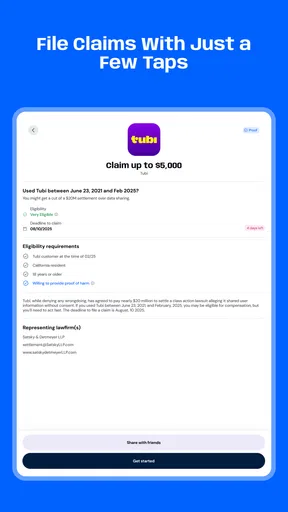
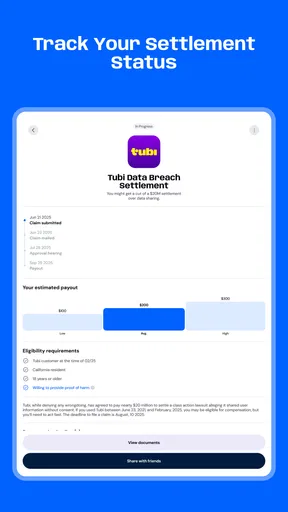
 Analysis by AppCompare
Settlemate’s appeal is easiest to understand in one familiar moment: a shared cost has been paid, but nobody can remember who covered what or how to divide it fairly. I like that the app focuses on turning that messy group tally into a clearer account of who owes whom. That is a more useful promise than a generic budgeting dashboard if your main headache is settling up with other people.
Where a shared-expense tool earns its place
For an individual budget, a spreadsheet or banking app may be better for tracking income, bills and spending over time. Settlemate is aimed at the awkward space between people: a trip, a flat, a meal or another shared purchase where the total is not necessarily split evenly. Its value is not simply recording that money changed hands; it is helping a group work out how to divide the cost without everyone doing the arithmetic independently.
That distinction matters when a group has several expenses and different people pay at different times. If one person books a place to stay, another buys groceries, and someone else covers transport, a quick mental calculation can become unreliable. A shared ledger gives the group a common reference point. My practical advice is to add costs close to when they happen, while the amount, payer and intended participants are still fresh in everyone’s mind.
Making the split fit the people involved
A useful detail in Settlemate is that participants can have individual shares rather than being forced into an equal division. That makes it a better fit for a dinner where people ordered different things, or a household purchase that only some flatmates use. Before recording an expense, I’d agree with the group who should be included and how the cost should be divided. The app can calculate a split, but clear expectations still prevent misunderstandings.
For a mixed group, a little care at entry time can save more work later. A shared grocery run might include common supplies as well as items for one person; separating those parts into appropriate expenses is often clearer than trying to reconstruct them at the end of the week. Similarly, on a trip, recording a booking as soon as it is paid makes it easier to remember which friends were included, especially if the group changes plans.
Everyday situations where it can help
Imagine four friends meet for dinner. One pays the bill, but two people ordered extra dishes and another did not have a drink. An even split might be quick, but it can feel unfair. With individual shares, the group can record a more suitable breakdown instead of relying on the person who paid to chase everyone later. The benefit is as much social as mathematical: the conversation can be about the agreed split rather than someone’s memory of the receipt.
For a shared home, the app may be useful for recurring informal costs such as household supplies or a meal bought for everyone. It is less suited to replacing a formal household budget or managing rent obligations that depend on a lease or a fixed payment schedule. I would use it to clarify shared spending, then keep any official payment records and agreements in the places the household already relies on.
Worth Reading Before You Choose

EA SPORTS FC Mobile 26 Is a Bigger Football Game, but It Takes Time

Flipboard Shows What News Apps Must Do Beyond the Feed

Switching to Android Auto Means Rethinking Your Driving Routine

Google Calendar Makes a Crowded Week Easier to Manage

Ludo King Makes the Most of the Minutes Between Plans

Baby Panda World Brings Quick Play to Modern Phones, but Its Game Library Feels Busy
It can also help when friends travel in different currencies. Settlemate supports multiple currencies, which is useful when a group’s expenses are not all made in the same one. My tip would be to decide how the group wants to handle conversion and settle consistently, rather than mixing casual estimates with exact amounts. A calculator or spreadsheet can still be handy for unusual arrangements, but having expenses in one shared record is easier than comparing separate notes and chat messages.
Getting Started with Settlemate
First things first, setting up Settlemate is a breeze. Available for both Android and iOS, you can easily download it from the app store and get started in no time. Once installed, you’re greeted with a clean and intuitive interface, which is always a plus in my book. No one likes fumbling around trying to figure out where things are.
Upon launching, you’ll need to create an account or log in. The process is straightforward, and you can even sign in using Google or Apple, which saves a lot of time. Now, you’re all set to dive into the world of streamlined expense management.
Main Features You’ll Love
One of the standout features of Settlemate is its ability to handle shared expenses with grace. Whether it’s a group trip, a dinner party, or simply splitting bills with a roommate, Settlemate lets you add participants, expenses, and even specify individual shares. The app calculates who owes whom and by how much. It’s like having a personal accountant in your pocket.
What’s more, Settlemate supports multiple currencies, which is a godsend if you’re dealing with international friends or expenses. Plus, the app can provide a detailed summary of your transactions, helping you keep track of your spending habits. It’s quite enlightening to see where your money goes at the end of the month.
Usability and Interface
The user interface is sleek and user-friendly, making it a joy to navigate. Everything is exactly where you’d expect it to be, and the app’s color palette is easy on the eyes — no glaring colors to distract you from your budgeting.
Adding new expenses or settling debts is as simple as tapping a button. It’s designed for quick entries, so you can manage your finances on the go without any hassle. I’ve noticed that even those who aren’t tech-savvy find it pretty straightforward to use.
Security and Privacy
In today’s digital world, security is key, and Settlemate doesn’t skimp on this. The app uses encryption to protect your data, and you have control over your privacy settings. Rest assured, your financial information remains confidential, which is something we all appreciate.
Real-Life Application
Let me share a quick story. I recently went on a trip with friends, and keeping track of who paid for what was a nightmare — until we used Settlemate. We added each expense as it happened, and by the end of the trip, settling up was painless. No more awkward conversations about money or complicated spreadsheets. Just tap a button, and voila, all debts settled!
Another time, I used Settlemate for a dinner party where everyone ordered different things. Instead of splitting the bill evenly, we entered each person’s order, and the app did the rest. It saved us time and potential arguments over who owed what. Honestly, it’s a game-changer.
Choosing it with realistic expectations
Settlemate is a finance app from Settlemate, and its narrow focus is also its main trade-off. It suits people who often share costs and want a straightforward way to keep the group’s running balance intelligible. It is not the choice I’d make if I mainly wanted charts for personal spending, automatic bill management or a formal record for reimbursements. For those jobs, a dedicated budgeting tool, a spreadsheet, or the payment service a group already uses may be more appropriate.
The app is free to start, while in-app purchases range from $13.99 to $34.99 per item. I’d check what an optional purchase adds and whether it matters to your group before paying; a one-off dinner may not justify buying anything, while regular shared expenses could make added convenience more valuable. It is rated for Everyone, has an average rating of 4.8 from around 27,000 ratings, and has over 100,000 installs. Those figures suggest it has found an audience, but they do not guarantee that its workflow will suit every household or travel group.
Settlemate was released on July 17, 2025, and version 4.1.0 requires Android 8.0 or later. If you are choosing it for a group, the practical question is not just whether you like the interface: will everyone who needs to record or check expenses be willing to use the same shared process? A group that agrees on that upfront is more likely to benefit than one where only the person who paid keeps the record.
Who benefits most, and who should look elsewhere
I’d recommend trying Settlemate if you regularly split costs with friends, housemates or travel companions, particularly when equal shares are not always fair. It is also a sensible option for someone who wants a clearer balance than a long chat thread can provide. A small group can get the most from it by entering each expense promptly, checking the participants before saving, and agreeing on a consistent approach to settling the final amounts.
I’d skip it if you mostly manage money alone, need a detailed personal budget, or expect a shared-expense app to resolve disagreements about what people agreed to pay. It can make the arithmetic easier, but the group still needs to communicate and enter accurate information. If your priority is simply sending money, a payment app may be quicker; if you need a tailored breakdown or permanent financial documentation, a spreadsheet or formal record may offer more control.
Conclusion: Why You Should Try Settlemate
In conclusion, if you’re looking for an app to help manage shared expenses and simplify your financial life, give Settlemate a whirl. It’s user-friendly, packed with useful features, and makes dealing with shared costs a breeze. Whether you’re planning a trip, sharing a flat, or just going out for dinner with friends, Settlemate is the trusty sidekick you didn’t know you needed.
With its straightforward setup and seamless functionality, Settlemate takes the headache out of expense management. So why wait? Download it today and wave goodbye to financial confusion. Trust me, once you try it, you won’t look back.
Pros
- User-friendly interface enhances navigation.
- Comprehensive budget tracking features.
- Customizable notifications for bill reminders.
- Supports multiple currencies efficiently.
- Intuitive visual reports for spending insights.
Cons
- Limited integration with external banks.
- Occasional sync issues with cloud storage.
- No offline mode available for data entry.
- Premium features behind a paywall.
- Lacks a dark mode for night use.
FAQs for Settlemate
What features does Settlemate offer to help manage property settlements?
Settlemate provides a comprehensive suite of features designed to streamline property settlement processes. Users can track settlement progress in real-time, manage documents securely, and communicate efficiently with all parties involved. The app also includes a calendar for important dates and automated reminders to ensure nothing is overlooked.
Is Settlemate available on both Android and iOS platforms?
Yes, Settlemate is available for download on both Android and iOS platforms. Users can find it on the Google Play Store for Android devices and the Apple App Store for iOS devices. The app ensures a consistent experience across both platforms, making it convenient for all users.
How secure is my data with Settlemate?
Settlemate prioritizes user data security with advanced encryption protocols to protect sensitive information. The app uses secure servers for data storage and has stringent access controls. Regular security audits and updates are conducted to ensure compliance with the latest security standards, providing peace of mind for users.
Are there any costs involved in using Settlemate?
Settlemate offers a free version with basic features, but to access premium features such as advanced analytics and priority customer support, users may need to subscribe to a paid plan. Pricing details are available within the app, allowing users to choose a plan that best fits their needs.
Can Settlemate integrate with other software I use for property management?
Yes, Settlemate is designed to integrate seamlessly with a variety of property management software. This integration allows for the import and export of data, ensuring that all your property management tools work in harmony. Check the app's settings for a list of supported integrations and setup instructions.


